



Kucuksu Rasathane
Uskudar Istanbul Turkey

Mon–Fri 09:00–18:00 (GMT+3)
Weekend: Closed
Fiber Connectivity - Fiber Optic Patch Panel
Rack Mount Fiber Optic Patch Panel
Fiber Optic Patch Panel (rack mount, sliding tray) is designed for termination and distribution of optical fiber links with fast access during installation and maintenance. The sliding mechanism provides a stable working platform for splicing, adapter changes, and cable management even after the panel is installed in the rack.
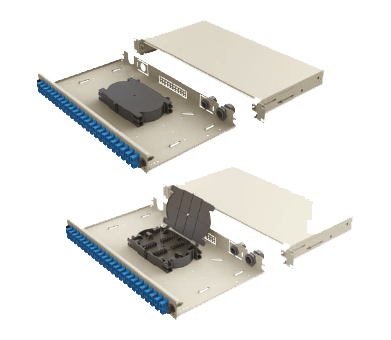
Rack mount (19")
Sliding tray
1U–4U
SC/FC/ST/LC/E2000
Field or factory preloaded
Internal links: Wall Mount Patch Panel · Fiber Breakout Patch Cord · Fiber Optic Cables
On this page
Why use a fiber optic patch panel?
Termination & protection
- Protects fiber terminations and adapters inside the rack
- Reduces stress on connectors with cleaner routing
- Supports structured labeling and maintenance workflow
Serviceability
- Sliding tray provides access for splicing and changes after installation
- Helps reduce downtime during re-termination or upgrades
- Works in telecom rooms, data centers, and premise fiber networks
External references: Optical fiber connectors · Optical fiber
Rack Mount Fiber Optic Patch Panel – features
- Sliding tray with mechanical slides for termination and maintenance access
- Delivered empty, half-loaded, loaded (ready to install), or preloaded with pigtails (project dependent)
- Printed port numbers on the front plate for faster patching
- Rear cable entry options (multiple entry holes)
- Durable powder coat finish (RAL9005 Black or RAL7035 Light Grey)
- RoHS aligned materials
Adapter & front panel options

Need a wall-mounted solution? See: Wall Mount Fiber Patch Panel .
Fiber Optic Patch Panel – Technical Specifications
| Parameter | Value |
|---|---|
| Rack compatibility | Universal 19" rack |
| Construction | Cold rolled steel |
| Finish | Textured powder coat |
| Colors | RAL9005 Black / RAL7035 Light Grey |
| Cable entry | 21 mm (2 pcs) + 23 mm (2 pcs) |
| Compliance reference | RoHS (2011/65/EU) |
Fiber Optic Patch Panel Sizes (1U–4U)
| Size | Width | Depth | Height |
|---|---|---|---|
| 1U | 48.5 cm | 25 cm | 4.45 cm |
| 2U | 48.5 cm | 25 cm | 8.9 cm |
| 3U | 48.5 cm | 25 cm | 13.5 cm |
| 4U | 48.5 cm | 25 cm | 18 cm |
For higher density (up to 6U), ask for project configuration.
How to install & terminate (rack mount patch panel)
- Select configuration: choose 1U–4U and adapter type (SC/LC/FC/ST/E2000).
- Mount in rack: fix the panel to 19" rails with correct alignment.
- Prepare cable entry: route fiber trunk through rear entry holes and strain relief.
- Splicing/termination: use the sliding tray as working platform; keep bend radius safe.
- Install adapters: mount adapter plates and label ports.
- Patching: connect patch cords, verify link budget and cleanliness.
- Maintenance: pull out tray for future access without removing the panel.
Related tool: Cable pushing machine (for specific installation workflows).
FAQ
Can I order the patch panel empty or fully loaded?
Yes. The rack mount patch panel can be delivered empty, half-loaded, loaded (ready to install), or preloaded with pigtails depending on project requirements.
Which adapter types are supported?
Common options include SC, FC, ST, LC and E2000 adapter plate configurations.
Why use a sliding tray patch panel?
The sliding tray provides easy access to splice trays and terminations after installation, reducing time for upgrades and maintenance.
Where is this patch panel typically used?
Telecommunication networks, central office distribution, data centers, premise fiber networks, and LAN/WAN infrastructure rooms.
Related links
Request a Quote
For a fast quotation, send U size, adapter type, port count, loaded/empty preference and quantity. Email: info@upcom.com.tr
info@upcom.com.tr