
Fiber Connectivity – Fiber Optic Patch Panel
Rack Mount Fiber Optic Patch Panel
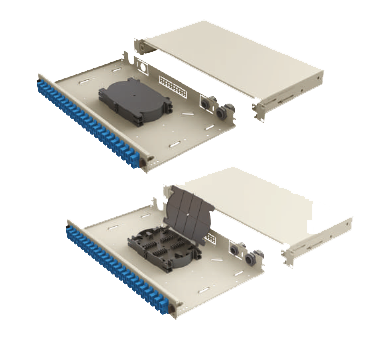
The rack mount fiber optic patch panel provides organized termination, splicing and distribution of optical fiber links in a standard 19-inch rack. Its sliding tray gives technicians access to splice trays, adapters and cable management during installation and maintenance without removing the panel from the rack.
Related Fiber Distribution Products
Wall Mount Patch Panel · Fiber Breakout Patch Cord · Fiber Optic Cables
Why use a fiber optic patch panel?
Termination & protection
- Protects fiber terminations and adapters inside the rack
- Reduces stress on connectors with cleaner routing
- Supports structured labeling and maintenance workflow
Serviceability
- Sliding tray provides access for splicing and component changes after installation
- Helps reduce downtime during re-termination or upgrades
- Suitable for telecom rooms, data centers and premises fiber networks
Rack Mount Fiber Optic Patch Panel Features
- Sliding tray with mechanical slides for termination and maintenance access
- Available empty, half-loaded, fully loaded or preloaded with pigtails, depending on project requirements
- Printed port numbers on the front plate for faster patching
- Rear cable entry options (multiple entry holes)
- Textured powder-coated finish in RAL 9005 Black or RAL 7035 Light Grey
- RoHS compliant in accordance with Directive 2011/65/EU
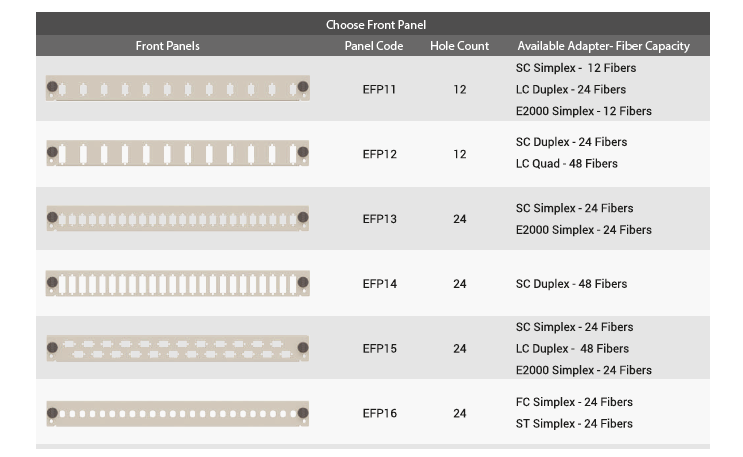
Adapter & front panel options
Need a wall-mounted solution? See: Wall Mount Fiber Patch Panel .
Fiber Optic Patch Panel – Technical Specifications
| Parameter | Value |
|---|---|
| Rack compatibility | Universal 19" rack |
| Construction | Cold-rolled steel |
| Finish | Textured powder-coated finish |
| Colors | RAL 9005 Black / RAL 7035 Light Grey |
| Cable entry | 2 × 21 mm and 2 × 23 mm openings |
| Compliance | RoHS Directive 2011/65/EU |
Fiber Optic Patch Panel Sizes (1U–4U)
| Size | Width | Depth | Height |
|---|---|---|---|
| 1U | 48.5 cm | 25 cm | 4.45 cm |
| 2U | 48.5 cm | 25 cm | 8.9 cm |
| 3U | 48.5 cm | 25 cm | 13.5 cm |
| 4U | 48.5 cm | 25 cm | 18 cm |
How to install & terminate (rack mount patch panel)
- Select configuration: choose 1U–4U and adapter type (SC/LC/FC/ST/E2000).
- Mount in rack: secure the panel to the 19-inch rack rails and check its alignment.
- Prepare cable entry: route the fiber cable through the rear entry and secure the strain relief.
- Splicing/termination: use the sliding tray as the working platform and maintain the cable manufacturer's minimum bend radius.
- Install adapters: mount adapter plates and label ports.
- Patch and test: inspect and clean connectors, connect patch cords and test the optical link.
- Maintenance: slide out the tray for future access without removing the panel.
FAQ
Can I order the patch panel empty or fully loaded?
Yes. The rack mount patch panel can be delivered empty, half-loaded, loaded (ready to install), or preloaded with pigtails depending on project requirements.
Which adapter types are supported?
Common options include SC, FC, ST, LC and E2000 adapter plate configurations.
Why use a sliding tray patch panel?
The sliding tray provides easy access to splice trays and terminations after installation, reducing time for upgrades and maintenance.
Where is this patch panel typically used?
It is commonly used in telecommunications networks, central offices, data centers, premises fiber networks and LAN/WAN equipment rooms.
Related Fiber Distribution Products
Request a Quote
For a fast quotation, send the rack-unit height, adapter type, port count, loaded or empty configuration and quantity. Email: info@upcom.com.tr
info@upcom.com.tr