


26 Dec 19″ Rack Cabinet Dimensions | 19-Inch Standard (U, Depth, Width)
19" Rack Cabinet Dimensions (19-Inch Standard Explained)
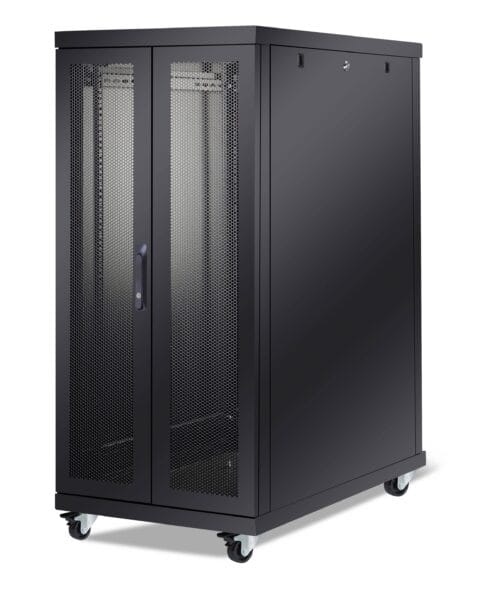
A 19" rack cabinet follows the global 19-inch mounting standard used for servers, switches, patch panels and rack-mounted PDUs. The key point is simple: compatibility depends on the 19" mounting geometry, not on the cabinet’s outer width. That is why a cabinet can be 600 mm or 800 mm wide outside and still be a true 19-inch rack cabinet inside.

Recommended product pages:
Server Rack Cabinet 19" (FS Line) | 19" Free Standing Rack | OXO Line 19" Rack Cabinets | Basic Line 19" Rack Cabinets | Wall Mount Rack Cabinet | All Rack Cabinets
On this page
19" Rack Cabinet Dimensions: Quick Reference
These are the dimensions most buyers search first when comparing a 19-inch rack cabinet, a 19-inch server rack or a network cabinet for patching and switching equipment.
Mounting width
482.6 mm
19 inches front mounting standard
Hole column spacing
465.1 mm
18.312" EIA spacing
Minimum opening
450 mm
17.75" clear opening
1U height
44.45 mm
1.75" rack unit
External references: Cisco EIA-310 rack geometry example | Vertiv rack dimension guide
What Does 19" Mean in a 19" Rack Cabinet?
In a 19" rack cabinet, the term 19 inch refers to the standardized equipment mounting width. It does not mean the whole cabinet is 19 inches wide from outside panel to outside panel.
This is where many buying mistakes start. A cabinet may be sold with an external width of 600 mm or 800 mm, but the internal mounting rails still follow the same 19-inch standard. So when checking compatibility, focus on the rail system, usable depth and U height, not just the outer cabinet footprint.
Simple rule: outer width affects cable space and site layout. Inner 19" geometry affects equipment compatibility.
19" Rack Cabinet U Height Explained
Rack height is measured in U (rack units). For every 19-inch rack cabinet, the formula is the same: 1U = 44.45 mm. Cabinet U height defines the usable vertical mounting space between the rails.
| Rack Height | Height (mm) | Height (inch) | Typical Use |
|---|---|---|---|
| 1U | 44.45 | 1.75 | Single switch, PDU, patch panel, shelf |
| 12U | 533.40 | 21.00 | Small LAN or branch office cabinets |
| 24U | 1066.80 | 42.00 | Growing telecom and network rooms |
| 42U | 1866.90 | 73.50 | Server rooms and data center style layouts |
A 42U rack cabinet is common because it balances usable capacity, cooling path and access for maintenance. If growth is expected, buying too small is usually more expensive than buying one size up.
How to Choose 19" Rack Cabinet Width and Depth
19" Rack Cabinet Width: 600 mm vs 800 mm
- 600 mm width: standard network and server room layouts, lower footprint, cost-efficient for general use.
- 800 mm width: more side cable space, easier vertical cable routing, cleaner management for dense patching and fiber-heavy installations.
19" Rack Cabinet Depth: 600 / 800 / 1000 / 1200 mm
- 600-800 mm depth: common for telecom cabinets, patch panels, switches and lighter network hardware.
- 1000-1200 mm depth: better for servers, slide rail kits, rear cable bend radius and airflow clearance.
Practical depth rule
Select cabinet depth based on equipment body length + connector and cable bend space + rear airflow/service clearance. Depth is the dimension people guess wrong, then discover the mistake when the rails arrive.
| Common Cabinet Size | Best For |
|---|---|
| 600 × 600 mm | Shallow network equipment and compact rooms |
| 600 × 800 mm | Typical LAN and structured cabling installations |
| 600 × 1000 mm | Mixed network and light server use |
| 800 × 1000 mm | Higher cable density with better side management |
| 800 × 1200 mm | Deeper servers, rail kits and more demanding airflow setups |
Internal guide: Choosing a 19" Rack Cabinet
IP Rating Basics for 19" Rack Cabinet Projects
IP rating uses two digits. The first digit relates to protection against solids and dust. The second digit relates to protection against water ingress. For outdoor cabinet projects, the real result depends not only on the cabinet body, but also on fan modules, filters, cable glands, door sealing and every opening added during installation.
IP55
Limited dust ingress protection and protection against water jets. Common for many outdoor telecom cabinet applications.
IP66
Dust-tight enclosure level with stronger water jet protection. Suitable where sealing expectations are higher.
Related internal pages: IP55 Outdoor Cabinet | Guard Box Basic IP66 Outdoor Cabinet
External references: IEC 60529 IP Code standard | TÜV SÜD IP testing overview
Main Parts of a 19" Rack Cabinet
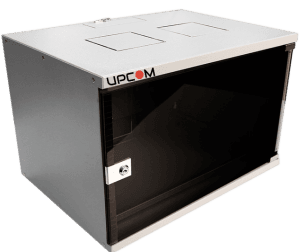
- Front door: glass or perforated metal depending on visibility and airflow needs
- Rear door or rear panel: service access and rear cable routing
- Mounting rails: adjustable 19" rails for active and passive rack equipment
- Top and bottom cable entries: cable routing points for power and data lines
- Side panels: removable or lockable depending on model
- Ventilation accessories: fan trays, roof exhaust options and airflow support parts
- Finish: electrostatic powder coating, commonly RAL 9005 or RAL 7035
FAQ About 19" Rack Cabinet Dimensions
Does 19 inch mean the cabinet is 19 inches wide from outside?
No. 19" refers to the internal mounting standard. External cabinet width is commonly 600 mm or 800 mm.
What is the most common 19" rack cabinet height?
42U is one of the most common choices for server rooms and structured cabling environments because it offers strong usable capacity without becoming impractical for access.
How deep should a 19-inch server rack be?
Choose depth according to the longest equipment, rail kit requirement, rear cable bend radius and airflow or maintenance clearance. For servers, 1000 mm to 1200 mm is commonly preferred.
Can an outdoor rack cabinet keep the same IP rating after fans and cable entries are added?
Only if every opening uses the correct sealing and rated accessories. Poorly sealed entries, vents or accessories can reduce real protection performance in the field.